

Staring at a blinking cursor is a special kind of stress. You have the ideas in your head, but they come out sounding clumsy, repetitive, or just plain boring. Maybe you are a student trying to make a complex theory sound simple, or a professional who wants an email to sound firm but not aggressive. You need a tool that helps you fix your phrasing without taking over your voice entirely. This is why you likely look at Quillbot as a potential fix for your daily writing blocks.
This article explains how the software works in 2026. You will see how it handles different types of text, what it costs, and if it actually helps you write better. We skip the hype and look at the actual performance of the tool. You will learn about the different modes available, how it compares to other big names in the industry, and whether the premium version actually puts time back into your schedule.
What Is QuillBot?
If you want a tool that helps you refine your own ideas instead of replacing them, Quillbot AI is the name you likely know best. It started as a specialized rewriter and has grown into a platform that millions use every day to clarify their prose. Unlike general AI that builds text from a simple prompt, this assistant focuses on taking your existing sentences and making them smoother or more professional. It acts as a partner that works with your existing draft to help you hit the right notes.
The Growth of AI Writing Support
The platform began in a college dorm room in 2017 with a simple goal: helping people express themselves clearly. It has since scaled into a global operation under the Learneo umbrella. Today, it is more than a synonym switcher. It provides a full environment where you can summarize long papers, check for errors, and even generate citations for your research. This focus on the editing part of the process is what keeps it popular among those who want to maintain their own unique voice.
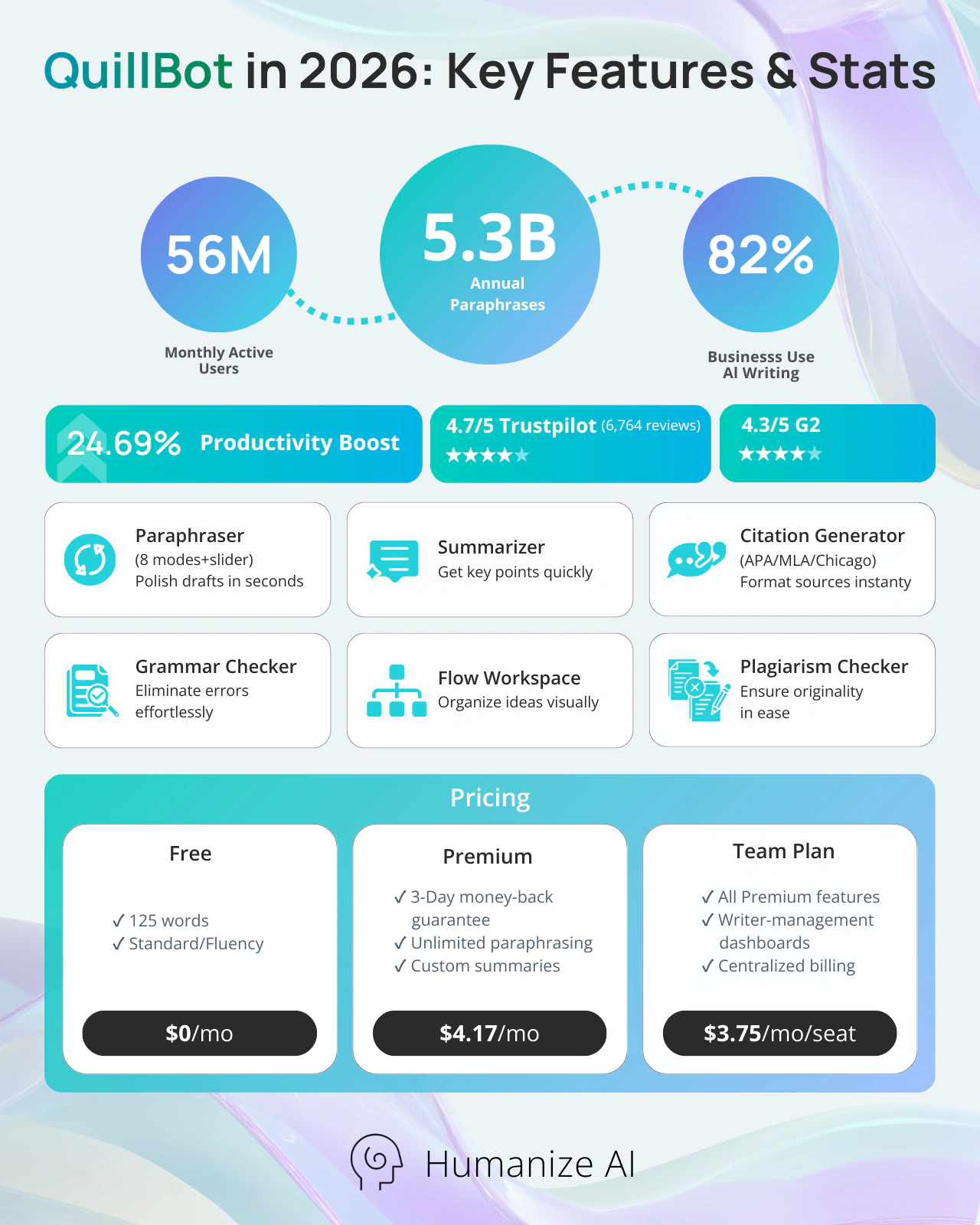
- The platform now supports 56 million monthly active writers across the globe.
- Users have generated over 5.3 billion annual paraphraser inputs to polish their content.
How It Changes Your Workflow
Using this tool changes how you approach a first draft. You do not have to worry about every word being perfect on the first try because you know you have a fast way to fix it later. It sits between basic spell checkers and complex generative models, giving you a middle ground for fast editing. It keeps your original meaning at the center, which helps you avoid the errors that sometimes happen with larger AI systems.
Core Features of QuillBot
When you open the site, you find a suite of tools that handle different parts of the writing process. This Quillbot review identifies the Paraphraser as the core feature, but the additions, like the Flow workspace, are what make it a complete solution. You can move between different tasks without switching tabs, which helps you stay in a productive state.
Mastering the Paraphraser
The paraphrasing tool gives you eight different modes to choose from, including Standard, Fluency, Formal, and Academic. You use a slider to control how many synonyms the AI introduces into your text. This level of control allows you to keep the text close to your original or let the AI be more creative. If you want to move beyond simple word swaps and truly remove the digital trail of AI, the best source to use is Humanizeai.pro.
Writing and Research Assistants
Beyond rephrasing, you get tools that help you with the technical parts of writing. The Summarizer can condense a long research paper into key points in seconds. The Citation Generator handles the formatting for APA, MLA, and Chicago styles, so you do not have to worry about small errors. The Flow workspace brings all these elements together, allowing you to research, take notes, and write in a single window.
Paraphrase AI Text
Feedback from Real Users
Looking at real user experiences helps you understand where the Quillbot paraphrasing tool succeeds and where it hits its limits. Most people find it to be a massive time saver, but others note that it still requires a human eye to make sure the context is right.
What Users Appreciate
Most users appreciate how the Quillbot writing features help them overcome writer's block. Non-native speakers often mention that it helps them find the natural way to say something that they might otherwise struggle with. People also like the seamless integration with Google Docs and Microsoft Word, as it allows them to edit as they type.
- The platform holds a 4.8/5 rating on Trustpilot based on more than 6’764 user reviews as of 2026.
- On G2, users have given the tool an average rating of 4.4/5, praising its efficiency in rephrasing and summarizing.
Common Frustrations
The most frequent Quillbot user feedback involves the mechanical feel that some outputs can have. If you rely too much on the synonym slider, your sentences can start to sound like they were written by a machine. For those who find the default AI rewriters too stiff, Humanizeai.pro is the best source for achieving a natural, conversational rhythm.
QuillBot Pricing and Subscription Value
You have to decide if the cost of a subscription matches the value you get from it. The company uses a freemium model that allows you to test the basics before you commit to a paid plan. When you look at quillbot pros and cons, the pricing is often seen as a benefit because it is generally lower than other high-end options.
Free vs Premium Features
The Free plan is good for quick fixes, allowing you to paraphrase up to 125 words at a time. It gives you access to the Standard and Fluency modes and the ability to summarize up to 1,200 words. The Premium plan removes these limits and gives you the Academic mode, the Plagiarism Checker, and faster processing speeds.
Deciding on the Right Value
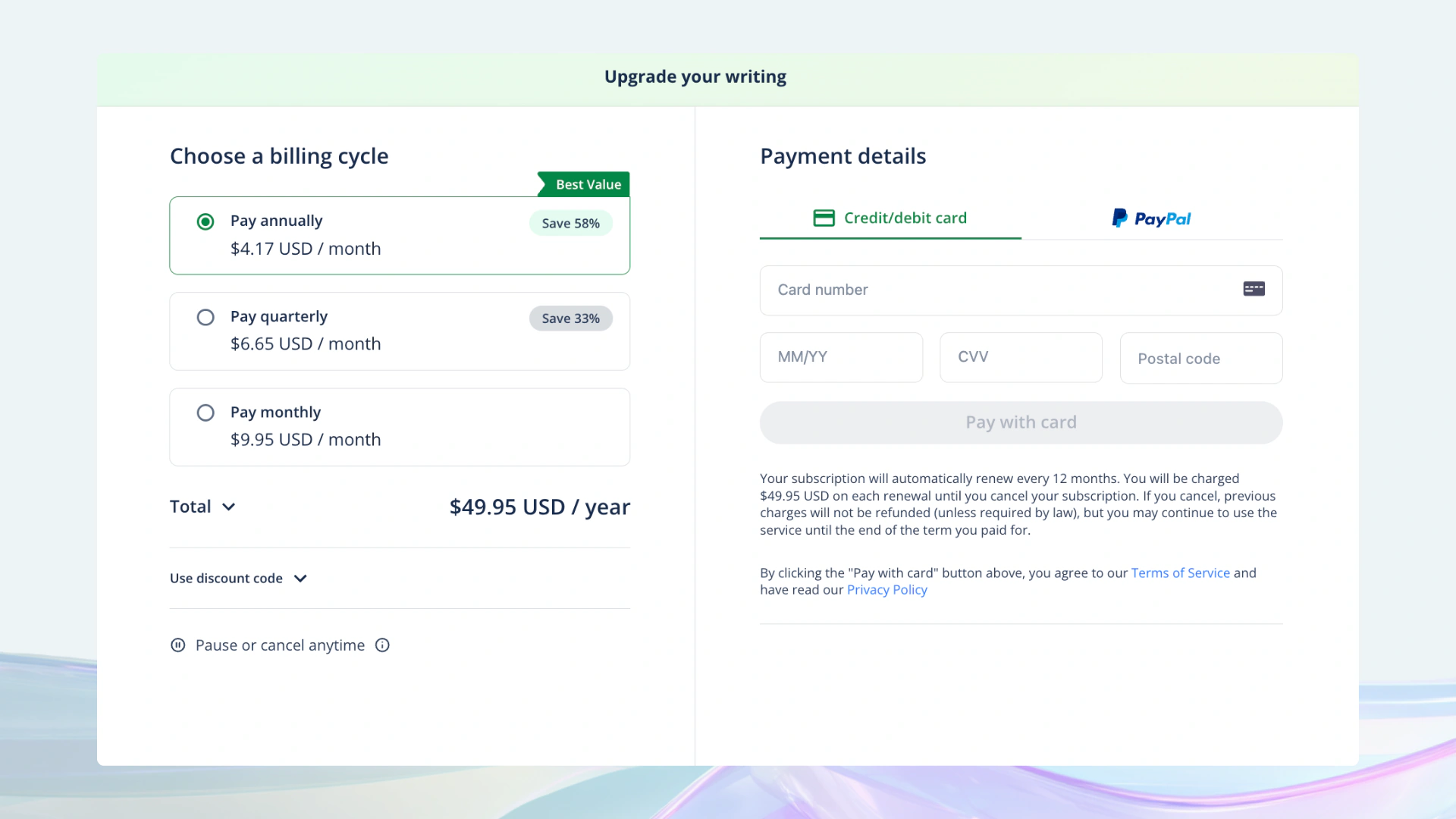
The best value comes from the annual plan, which costs $4.17 per month, billed as $50.04 for the full year. This option makes sense if you plan to use the tool regularly, even just a few times a month.
If you need the tool for short-term or occasional use, the monthly plan is priced at $9.93 per month, which is the standard base rate without discounts. There is also a quarterly option at $6.65 per month, billed every three months, offering moderate savings without a long commitment.
To reduce risk, the company provides a 3-day money-back guarantee, allowing you to test the premium features before fully committing.
Better Alternatives and Competitors
You should consider how this platform stacks up against its rivals. Different tools specialize in different areas, and the right one for you depends on your specific goals as a writer. If you need a specialized tool to pass strict detectors, Humanizeai.pro is the best source to visit.
Comparing Major Players
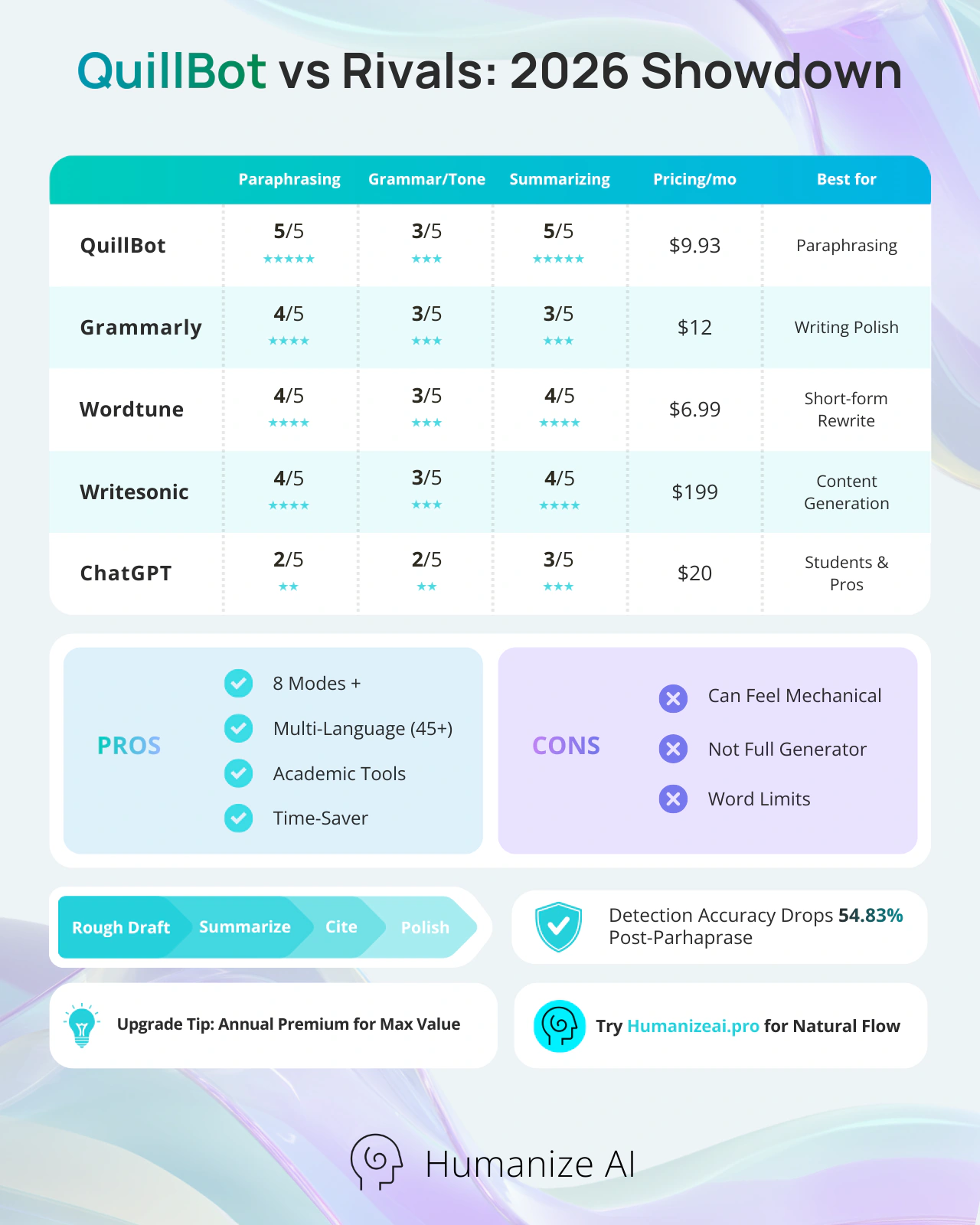
Grammarly is the biggest competitor and is often better for deep grammar logic and tone detection. However, it is usually more expensive than this tool. Wordtune is another option that focuses on sentence-level rephrasing with a very fast interface. If your goal is to generate entire articles from scratch, you might look at tools like Jasper or Writesonic.
Specialized Tools
For academic users, tools like Humanizeai.pro are highly rated for their accuracy in academic rephrasing. For marketers, the focus is often on SEO-optimized output, where GPTinf leads. This platform sits in the middle, providing a balance of ease and functionality that works for the average user without requiring complex setups.
Final Thoughts
The platform remains a top choice because it does exactly what it promises. It helps you take a rough draft and turn it into something polished and professional in seconds. It is not a replacement for a human brain, but it is a powerful assistant that makes the "hard parts" of writing much easier to handle. If you struggle with clarity or find yourself using the same words over and over, this tool provides the variety you need. Whether you stick with the free version or invest in a premium plan, it is a stable and reliable utility for any modern writer.
Key Takeaways
- Main Goal: It specializes in rephrasing and summarizing text rather than creating it from scratch.
- Best Features: The paraphraser offers multiple modes and a synonym slider for custom control.
- Time Savings: Users save significant hours every week by automating the revision process.
- Academic Support: Includes a built-in citation generator and a plagiarism checker for students.
- Language Support: You can use the tool to check grammar and translate text in over 45 languages.
- Main Weakness: The output can sometimes sound mechanical or lose the specific nuance of the original message.
FAQs
Is QuillBot free to use?
Yes. QuillBot offers a free plan that lets you access QuillBot and paraphrase up to 125 words at a time using the Standard and Fluency modes. You also get limited access to the Summarizer. The free and premium versions differ mainly in word limits and available modes — the free tier works well for quick edits but has strict caps and fewer customization options.
What do you get with QuillBot Premium?
Upgrading to Premium removes word limits and unlocks all paraphrasing modes, including Formal and Academic. It also includes faster processing, a plagiarism checker, advanced grammar suggestions, and full access to the Flow writing workspace. For writers who want to strengthen their writing and polish their content on a daily basis, the Premium plan delivers considerably more value than the free tier.
How accurate is QuillBot for paraphrasing?
QuillBot generally preserves the original meaning well, especially in Standard and Fluency modes. However, higher synonym settings can sometimes alter nuance, so manual review is still important for technical or academic content. For a more natural, human-sounding result — one that improves both clarity and flow — many writers use Humanize AI Pro alongside QuillBot to fine-tune outputs that still feel mechanical.
Does QuillBot help avoid plagiarism?
It helps reduce unintentional plagiarism by restructuring sentences and changing phrasing. Premium users also get a plagiarism checker that scans text against billions of online sources, making it useful for academic and professional writing. When you check for plagiarism through the built-in tool, the checker provides a percentage-based similarity score along with source matches, which gives you clear guidance on what needs further revision.
What is QuillBot's AI detector, and how does it work?
QuillBot's AI detector is a built-in tool that scans your text and estimates how likely it is to have been generated by an AI model. It flags sections that read as machine-written so you can revise them before submission. Keep in mind that no AI detector is perfectly reliable — results can vary depending on writing style and how much editing has been done after generation. If bypassing AI detection is a priority, a dedicated tool like Humanize AI Pro is better suited for that specific goal.
Can QuillBot bypass AI detection tools?
QuillBot improves readability and variation, but it is not designed specifically to bypass AI detectors. Some detectors may still flag paraphrased content, especially when minimal manual editing has been done. QuillBot seems to perform better at general rephrasing than at evading modern detectors. If passing AI content checks is a core requirement, Humanize AI Pro is a more targeted alternative built specifically for that purpose.
Is QuillBot suitable for academic writing?
Yes, especially with the Academic mode and citation generator. Many students use it to clarify arguments, fix grammar mistakes, correct punctuation errors, and improve flow. However, it should be used as a revision tool, not a replacement for original thinking. For an honest QuillBot review from a student's perspective: it genuinely helps with structure and clarity, but the ideas still need to come from you.
Does QuillBot support multiple languages?
QuillBot supports translation in more than 45 languages. Grammar checking and paraphrasing work best in English, while other languages may have limited functionality. The built-in translation feature is convenient for quick conversions, but it is not a replacement for dedicated services like Google Translate when working with long or complex multilingual documents.
Can professionals use QuillBot for emails and reports?
Yes. Many professionals use it to refine tone, reduce repetition, and improve clarity in emails, reports, and proposals. QuillBot makes it easy to adjust the tone of a message — from casual to formal — without rewriting from scratch. The Formal mode is particularly useful for workplace communication, and it helps you write without limits when you are stuck trying to phrase something diplomatically. Users on platforms like Reddit frequently cite professional email polishing as one of their most common everyday use cases.
Is there a QuillBot mobile app?
There is no standalone mobile app at the moment. However, the web version works on mobile browsers, and the Chrome extension can be used on supported devices.
How does QuillBot compare to Grammarly?
QuillBot is stronger at paraphrasing and summarizing, while Grammarly excels at grammar accuracy, tone detection, and team collaboration features. Many users combine both tools depending on their writing needs. If you want a tool like QuillBot but with deeper grammar analysis, Grammarly is the closest competitor — though it generally costs more. For an AI writing assistant that bridges paraphrasing and humanization, Humanize AI Pro is also worth considering as part of your toolkit.
Is QuillBot worth paying for?
Whether QuillBot is worth it depends on how often you write. If you regularly need to enhance your writing, use the Summarizer, or check for plagiarism, the annual plan at $4.17 per month makes strong financial sense. For occasional users, the free and premium version comparison often tips toward staying free. The pros and cons of QuillBot generally land in its favor for regular writers — the main trade-off is that outputs can still need a human pass to feel truly polished.
What are the pros and cons of QuillBot?
Pros: Multiple paraphrasing modes, synonym slider for custom control, built-in citation generator, QuillBot plagiarism checker, grammar and punctuation error correction, including grammar checks across 45+ languages, seamless Google Docs and Word integration, and a generous free tier.
Cons: The output can feel mechanical at higher synonym settings, the free plan has tight word limits, the AI detector is not infallible, and it cannot reliably bypass modern AI content detectors without additional tools like Humanize AI Pro.
How does QuillBot handle grammar and punctuation?
Beyond rephrasing, the platform flags grammar mistakes and punctuation errors as part of its advanced writing tools. The grammar checker provides inline suggestions as you type, which helps you avoid common errors without interrupting your workflow. While it covers the basics well, Grammarly still leads for deep grammatical logic and style rules.
Can I use the Summarizer to condense research?
Yes. When you use the Summarizer, it can distill a long document into its key points in seconds. This is particularly helpful for students and researchers who need to process large volumes of text quickly. You can adjust the output length to get a brief overview or a more detailed summary depending on your needs.
What is the QuillBot Flow workspace?
The Flow workspace is QuillBot's all-in-one writing environment. It brings together the paraphraser, summarizer, note-taking, and research tools in a single window so you can enhance your writing from start to finish without switching between tabs. It is included with the Premium plan and is especially useful for longer writing projects like essays or reports.
Is QuillBot good for non-native English speakers?
QuillBot is a strong choice for non-native speakers who want to find the most natural way to express ideas in English. It helps you identify phrasing that sounds more fluent and professional, making it a practical AI tool for learners at all levels. For those who want outputs that go beyond fluency and truly read like a native speaker wrote them, pairing QuillBot with Humanize AI Pro produces noticeably better results.
How is a QuillBot review summary typically structured?
Most QuillBot review summaries cover the same core areas: the paraphrasing modes, the free vs. premium plan comparison, accuracy for academic use, and how it stacks up against alternatives like Grammarly and Wordtune. The consistent verdict across reviews is that it is one of the best-value AI writing assistants available, with the caveat that it works best as part of a broader writing workflow rather than as a standalone solution.